If you’re ready to take charge of your finances without relying on Quicken, we’ve curated the best personal finance software for Mac in 2025—tools that outperform Quicken in usability, pricing, and features, with options ranging from free to one-time purchases.
After rigorous testing of dozens of macOS-compatible financial tools, we named Empower (FREE) the top pick. It skips subscriptions, syncs seamlessly with U.S. banks via Plaid (a more reliable alternative to Quicken’s Direct Connect), and excels at optimizing investments and retirement planning .
| Tool | Quicken Data Import | Pricing | Free Trial | Investment Tracking | Budgeting | Bank Syncing |
| Empower | No | Free | N/A | Yes | No | Yes (Plaid) |
| Moneyspire | Yes | $59.99 one-time | 30 days | Yes | Yes | No |
| Banktivity | Yes | Starts at $59.99/year | 30 days | Yes | Yes | Yes (Direct Access) |
| Moneydance | Yes | $69.99 one-time / $9/month (with sync) | 90 days | Yes | Yes | Yes (Plaid/Direct Connect) |
| Copilot | No | $13/month / $95/year | 30 days | No | Yes | Yes |
| Money Pro | Yes | $4.99 + $29.99/year (Plus) / $69.99/year (Gold) | 7 days | Limited | Yes | Yes |
| Tiller | Yes (via CSV) | $79/year | 30 days | Yes | Yes | Yes (via Sheets) |
| Money Manager Ex | Yes (CSV/QIF) | Free | N/A | Yes | Yes | No |
| YNAB | No | $109/year / $9.08/month | 34 days | No | Yes | No |
| MoneyWiz | Yes | $49.99/year | 30 days | Yes | Yes | Yes (3 services) |
| CheckBook Pro | No | $29.99 one-time | 30 days | No | Yes | No |
| SEE Finance 2 | Yes | $39.99 one-time | 30 days | Yes | Yes | Yes |
| CountAbout | Yes | $9.99/year / $39.99 (Direct Connect) | 15 days | No | Yes | Yes |
| MoneyWell | Yes | $49.99 one-time / $5.99/month | 60 days | No | Yes | No |
Below is our detailed breakdown of the best Mac-compatible personal finance apps for 2025, with insights to help you find your perfect match.
1. Empower (Free)
Why We Picked It
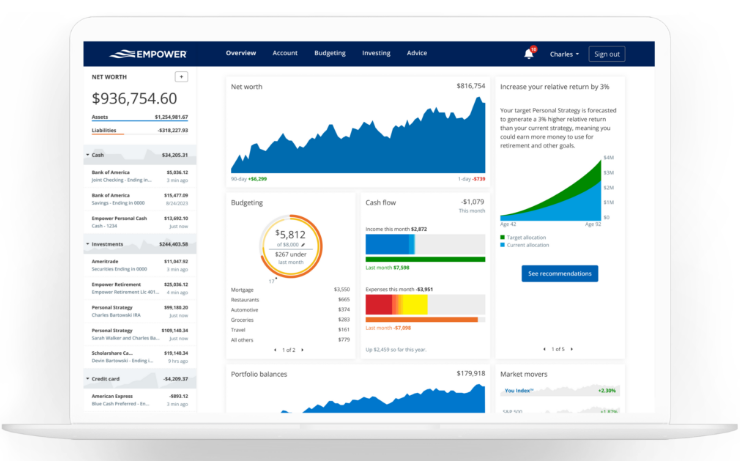
Empower stands out as the ultimate free solution, blending top-tier investment monitoring with dependable budgeting features . It syncs seamlessly with major U.S. banks, credit cards, and retirement accounts (including 401(k)s) through the secure Plaid network—far more reliable than Quicken’s outdated Direct Connect. What sets it apart is its institutional-grade retirement analysis, which includes compound interest projections, inflation adjustments, and fee optimization . While it offers optional financial advisory services, you’re never obligated to use them. Even without Quicken import support, it’s the best choice for Mac users balancing daily finances and long-term wealth building.
Who It’s Aimed At
- Users with multiple bank or investment accounts
- Anyone planning for retirement or major life milestones
- Those seeking a free, all-in-one financial dashboard
- Mac users frustrated by Quicken’s syncing failures
Pricing
Free (no hidden fees) – Learn More
✅ Pros & ❌ Cons
✅ Completely free with no subscriptions
✅ Reliable syncing for banks, credit cards, and 401(k)s
✅ Robust investment and retirement planning tools
✅ Secure – never stores or transmits login credentials
✅ Optional access to fiduciary financial advisors
✅ Full-featured iOS app for on-the-go management
❌ No Quicken file import (QIF/QFX support)
❌ Only exports data in CSV format
2. Moneyspire
Why We Picked It
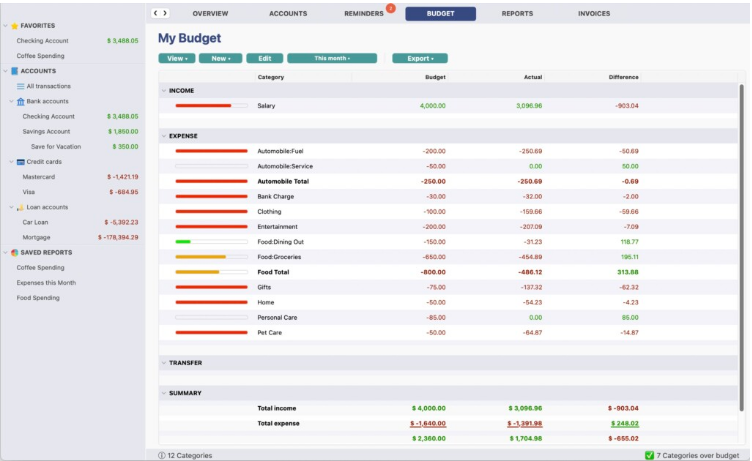
For users who prefer offline control over cloud-based tools, Moneyspire 2025 is a top Quicken alternative. It offers customizable budgeting, account tracking, and light invoicing—all with a one-time purchase and no mandatory cloud sync. It seamlessly imports data from Quicken, Mint, and even Microsoft Money, making it easy to switch. The app supports check printing (a rare feature for Mac) and detailed reporting, ideal for those prioritizing privacy and simplicity. Plus, it currently offers 40% off standard pricing, delivering exceptional value.
Who It’s Aimed At
- Mac users wanting an offline, non-cloud finance solution
- Former Quicken, Mint, or Microsoft Money users migrating data
- Small business owners needing basic invoicing tools
- Anyone avoiding recurring subscription fees
Pricing
Standard: $59.99 / Pro (with invoicing): $79.99 – 30-day free trial available
✅ Pros & ❌ Cons
✅ One-time purchase (no forced subscriptions)
✅ Imports/exports data from Quicken, Mint, and MS Money
✅ Supports check printing and bill reminders
✅ Optional cloud sync and iOS app for mobile access
✅ 30-day money-back guarantee
❌ Annual upgrade required for Moneyspire Connect
❌ Occasional re-authentication needed for syncing
❌ Basic tax features and limited investment analysis
3. Banktivity
Why We Picked It
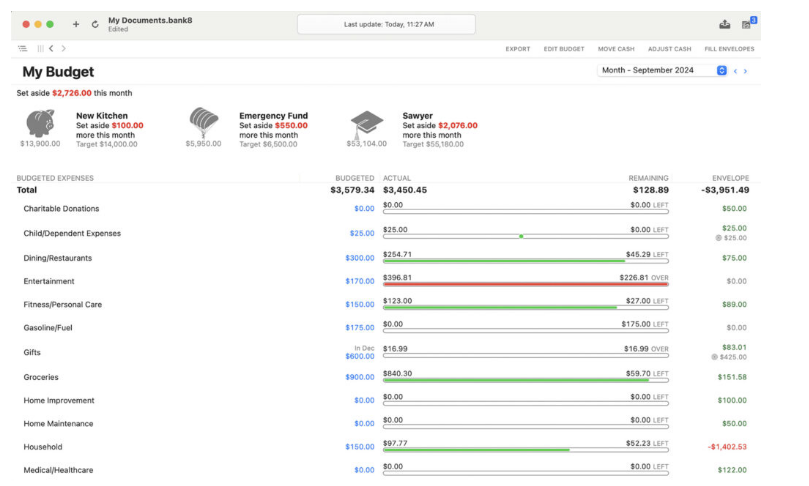
Banktivity (formerly iBank) is built exclusively for Apple users, offering deep integration with macOS, iOS, and Apple Watch. It’s a favorite for its reliable Direct Access syncing—including support for UK/EU Open Banking via Salt Edge—and flexible budgeting (both traditional and envelope methods). For Quicken refugees, it imports years of historical data seamlessly. While it’s now subscription-based, the tiered plans (Bronze, Silver, Gold) let you pay only for the features you need.
Who It’s Aimed At
- Longtime Apple users seeking a native finance tool
- Quicken/Mint users wanting to preserve historical data
- International users needing UK/EU Open Banking support
- Investors desiring in-depth portfolio tracking
Pricing
Bronze: $59.99/year, Silver: $79.99/year, Gold: $99.99/year – Free trial available
✅ Pros & ❌ Cons
✅ Designed specifically for Mac, iOS, and Apple Watch
✅ Reliable syncing with U.S. and international banks
✅ Flexible budgeting options (traditional + envelope)
✅ Customizable reports with tagging and quick insights
✅ Clean, modern interface with strong mobile integration
❌ Subscription-only (no one-time purchase option)
❌ Advanced features locked behind higher-tier plans
❌ Imperfect historical data imports at times
4. Moneydance
Why We Picked It
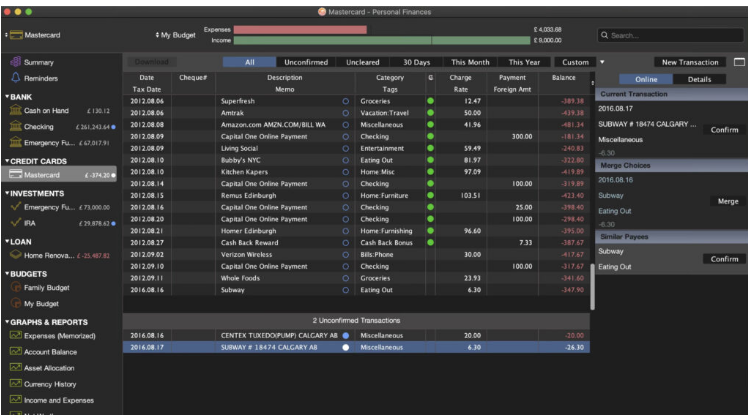
Moneydance is a longtime favorite for Mac users leaving Quicken, offering robust investment tracking, multi-currency support, and powerful budgeting—all without mandatory subscriptions. Its straightforward interface provides a complete financial overview, while add-ons and an enhanced undo feature add flexibility. It works offline and offers a one-time purchase option, making it ideal for budgeters who value control. For bank syncing, it supports both Direct Connect and Plaid via Moneydance+.
Who It’s Aimed At
- Quicken/Mint users looking for a subscription-free alternative
- Investors managing multiple currencies or asset types
- Users prioritizing offline use and manual control
- Budgeters wanting a customizable yet simple desktop tool
Pricing
$69.99 one-time (no sync) / $9/month (with bank sync) – 90-day free trial available
✅ Pros & ❌ Cons
✅ One-time purchase option (no mandatory subscriptions)
✅ Strong investment tracking with real-time stock updates
✅ Multi-currency support and calendar view for transactions
✅ Useful add-ons and enhanced undo feature
✅ 90-day money-back guarantee
❌ Direct Connect syncing can be unreliable
❌ Moneydance+ (Plaid sync) costs extra
❌ Mobile app limited to manual entry (syncs via Dropbox)
5. Copilot
Why We Picked It
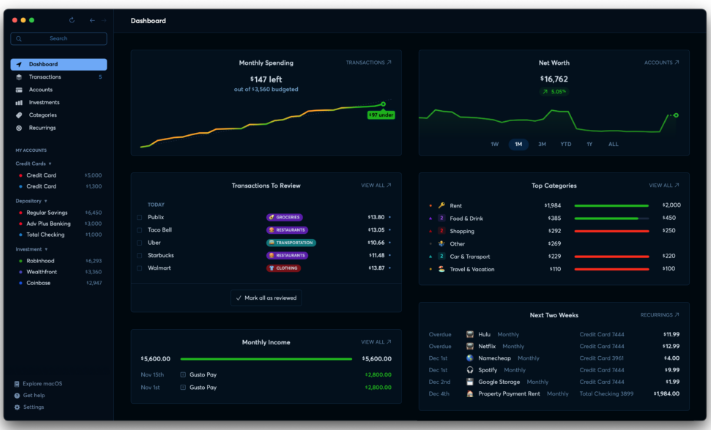
Copilot is the most visually polished budgeting app for Mac, with a sleek design that translates seamlessly across iPhone, iPad, and Apple Watch. It delivers daily spending snapshots, net worth tracking, and category-based summaries—perfect for visual thinkers. Recent updates added a Mint import tool, making it a top choice for former Mint users (especially with Mint’s shutdown). It syncs automatically across Apple devices and works with both Intel and Apple Silicon Macs, though it’s currently U.S.-only.
Who It’s Aimed At
- Apple ecosystem users wanting cross-device syncing
- Visual learners who prefer modern, intuitive interfaces
- Former Mint users seeking a seamless transition
- U.S.-based users needing simple, powerful money tracking
Pricing
$13/month / $95/year – Available on the Mac App Store and Copilot’s website
✅ Pros & ❌ Cons
✅ Slick, consistent design across all Apple devices
✅ Daily spending snapshots and bill reminders
✅ Automatic syncing between Mac, iPhone, and iPad
✅ Supports category rollovers for unused budgets
✅ Mint import tool for easy migration
❌ No free version (subscription-only)
❌ Limited advanced features for power users
❌ No manual CSV/QIF importing
6. Money Pro
Why We Picked It
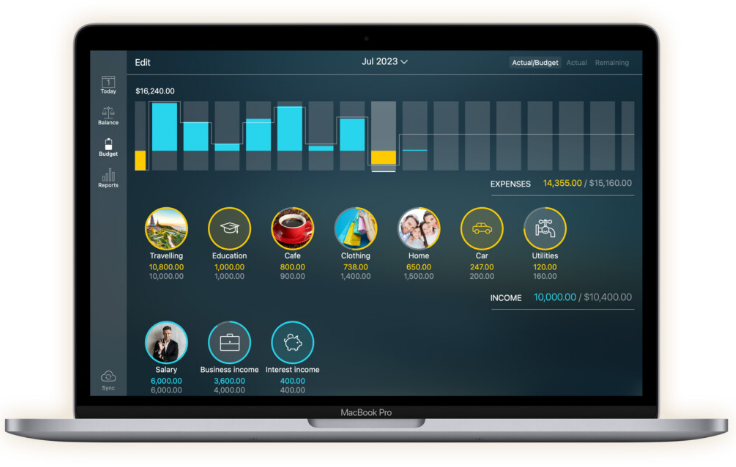
Money Pro combines a clean, Apple-centric design with flexible budgeting and bill tracking. It offers calendar-based bill planning, real-time alerts, and multi-currency support—ideal for users who want simplicity without sacrificing functionality. With iCloud syncing, it works seamlessly across Mac, iPhone, and iPad. It’s a great fit for families or couples needing profile-based budgeting, though key features (like bank syncing) require in-app purchases.
Who It’s Aimed At
- Users wanting a lightweight, Apple-exclusive finance app
- Families/couples needing shared budgeting profiles
- Manual budgeters who prefer checkbook-style tracking
- Those who want calendar-based bill scheduling
Pricing
$0.99 base app + $29.99/year (Plus) / $69.99/year (Gold) – No free trial
✅ Pros & ❌ Cons
✅ Simple, attractive interface across Apple devices
✅ Calendar and Today views for bill tracking
✅ Supports receipt photo attachments and manual reconciliation
✅ iCloud syncing and multi-currency support
✅ Multiple user profiles with overspending alerts
❌ Key features locked behind in-app purchases
❌ Inconsistent bank syncing with some institutions
❌ No envelope budgeting or free trial
7. Tiller
Why We Picked It
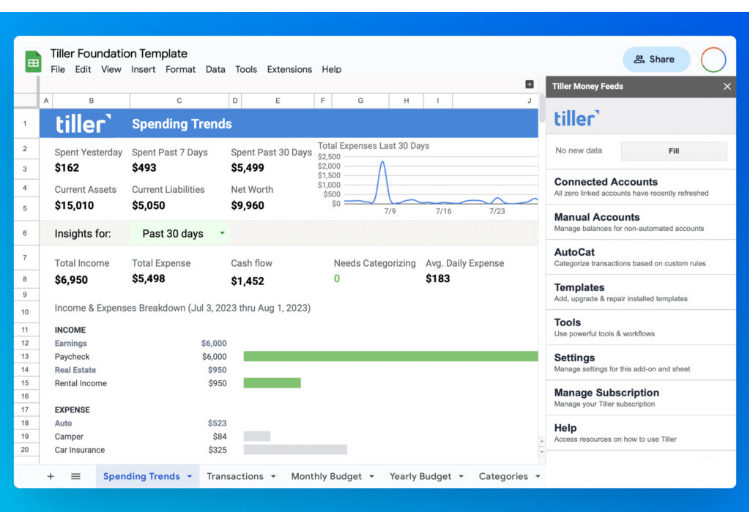
Tiller is perfect for spreadsheet lovers who want automation without losing customization. It connects to your U.S. banks and automatically pulls transactions into Google Sheets or Excel, letting you build fully personalized budgets and trackers. Your financial data stays local to your spreadsheet (no cloud storage), appealing to privacy-focused users. The new Spending Trends dashboard adds visual insights, though setup takes time for first-time users.
Who It’s Aimed At
- Excel/Google Sheets users comfortable with spreadsheets
- DIY budgeters wanting full control over categorization
- Users prioritizing local data storage over cloud apps
- Those seeking advanced tracking without a dedicated app
Pricing
$79/year – 30-day free trial available
✅ Pros & ❌ Cons
✅ Automates bank feeds directly into spreadsheets
✅ Works with both Google Sheets and Microsoft Excel
✅ Customizable templates and Spending Trends dashboard
✅ No cloud storage – data stays in your spreadsheet
✅ 30-day free trial to test functionality
❌ Setup requires time (especially from scratch)
❌ Not ideal for spreadsheet novices
❌ No native desktop or mobile apps
8. Money Manager Ex (MMEX)
Why We Picked It
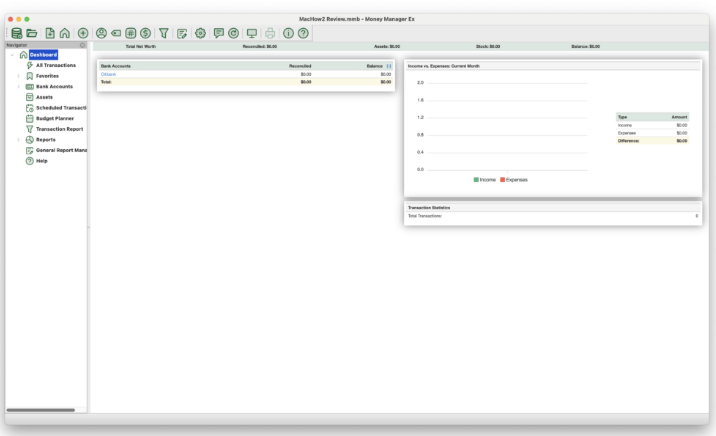
Money Manager Ex is a free, open-source tool that covers all the basics: budgeting, expense tracking, and basic investment monitoring. It works entirely offline, with no cloud storage—perfect for users who want full control over their data. It imports Quicken QIF and CSV files, making it easy to migrate old data. While the interface is basic, it’s a solid no-frills option for anyone avoiding paid software.
Who It’s Aimed At
- Users wanting free, offline personal finance software
- Those comfortable without automatic bank syncing
- People migrating old Quicken data to a new tool
Pricing
Free (open-source) – No free trial needed
✅ Pros & ❌ Cons
✅ Completely free with no hidden costs
✅ Imports Quicken QIF and CSV files
✅ Works offline with no cloud dependency
✅ Supports budgeting, expense tracking, and basic investments
❌ No online bank syncing
❌ Outdated, basic interface
❌ Limited features compared to paid tools
❌ Community-only support (no official help)
9. YNAB (You Need A Budget)
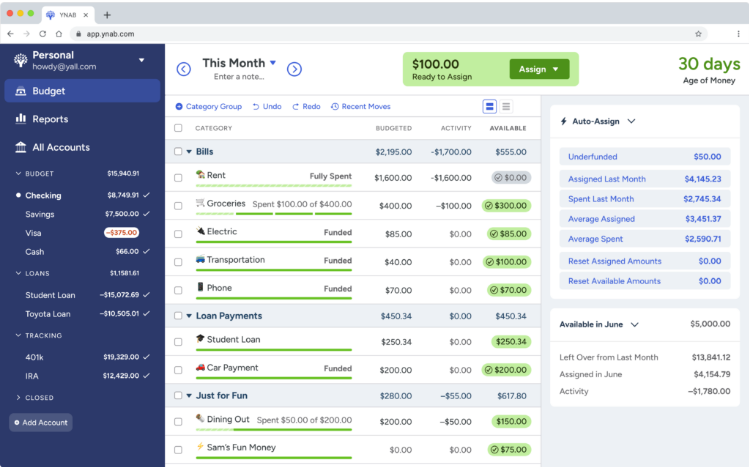
Why We Picked It
YNAB is a game-changer for anyone struggling to stick to a budget. Its zero-based budgeting method—built around four core principles—teaches you to allocate every dollar, prepare for irregular expenses, and adapt to surprises. It syncs with over 12,000 U.S. banks via Direct Connect and works with Apple Watch and Alexa for voice control . While it lacks investment tracking, it’s proven to help users break the paycheck-to-paycheck cycle, with 89% achieving financial goals within 18 months . U.S. college students get free access.
Who It’s Aimed At
- Users escaping the paycheck-to-paycheck cycle
- Students and families building financial discipline
- Budgeters wanting education alongside software
- Those who don’t need investment tracking features
Pricing
$109/year / $9.08/month – 34-day free trial (free for U.S. college students)
✅ Pros & ❌ Cons
✅ Highly effective, rule-based budgeting method
✅ Syncs with 12,000+ U.S. banks and UK/EU banks via TrueLayer
✅ Works with Apple Watch and Alexa
✅ Clear net worth and spending reports
✅ 34-day free trial with no credit card required
❌ No investment tracking or multi-currency support
❌ No EWC+ support (some banks won’t sync)
❌ Steep learning curve for new users
❌ Syncs via Dropbox (no iCloud support)
10. MoneyWiz
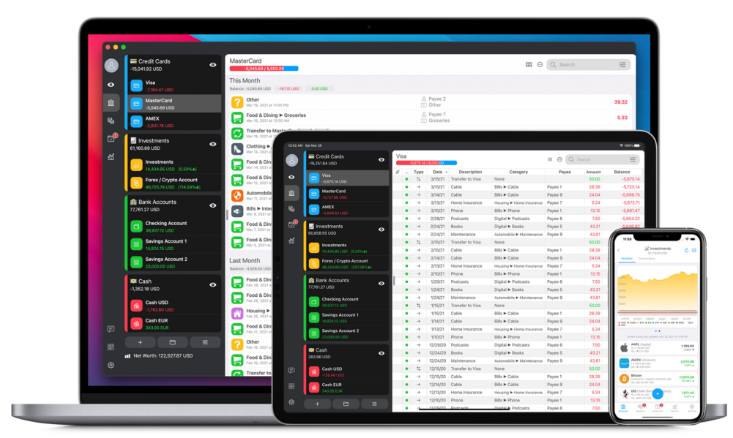
Why We Picked It
MoneyWiz offers exceptional value for Mac users wanting a full-featured app with Apple-native design. It tracks nearly every account type—including crypto, stocks, and Robinhood investments —with flexible syncing via three different services for reliability. The free desktop app lets you test core features, while affordable subscriptions unlock advanced tools. It syncs seamlessly between macOS and iOS, making it ideal for users managing diverse assets.
Who It’s Aimed At
- Apple users wanting a consistent cross-device experience
- Those managing crypto, stocks, and traditional accounts
- Budgeters seeking customizable syncing options
- Users wanting flexibility in bank connections
Pricing
Free desktop app / $24.99/year (Standard) / $49.99/year (Premium) – 30-day free trial
✅ Pros & ❌ Cons
✅ Free desktop app with optional low-cost subscriptions
✅ Tracks crypto, stocks, loans, and Robinhood investments
✅ Flexible syncing with 3 connection services
✅ Reliable macOS-to-iOS syncing
✅ Active developer support and Apple-native design
❌ Syncing requires a subscription
❌ No live chat support for Mac users
❌ Occasional syncing issues with third-party aggregators
11. CheckBook Pro
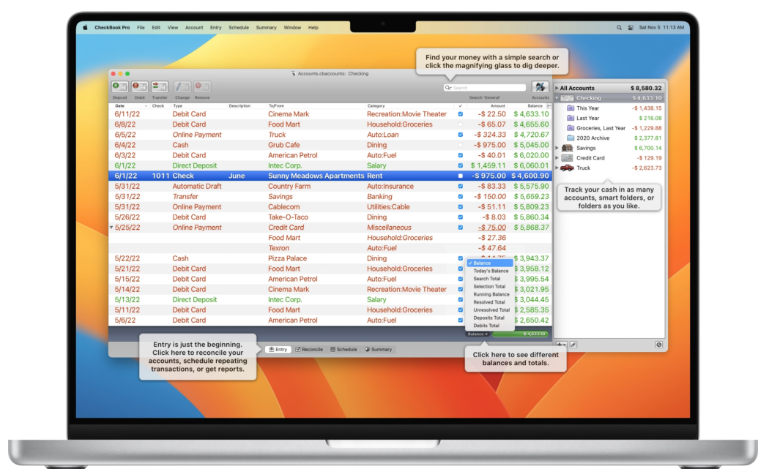
Why We Picked It
CheckBook Pro is a no-nonsense check register app for Mac that does exactly what it promises: tracks your money without complexity or subscriptions. It’s ideal for users who prefer manual checkbook-style budgeting, with one-time payment and no cloud dependency. It imports data from Quicken (QFX, OFX, CSV) and generates detailed reports, though it’s best for 1–2 accounts. The Pro version adds check printing and iCloud sync.
Who It’s Aimed At
- Users preferring manual, checkbook-style budgeting
- Anyone wanting a lightweight, offline money tracker
- Those migrating from Quicken using standard file formats
Pricing
$29.99 – Free trial available on the Mac App Store
✅ Pros & ❌ Cons
✅ One-time payment (no subscriptions)
✅ Extremely easy to use with a simple interface
✅ Imports from Quicken and other standard formats
✅ Generates detailed reports and supports check printing
✅ iCloud sync in the Pro version
❌ No automatic bank syncing
❌ Best for 1–2 accounts (not for multiple accounts)
❌ Time-consuming manual data entry
12. SEE Finance 2
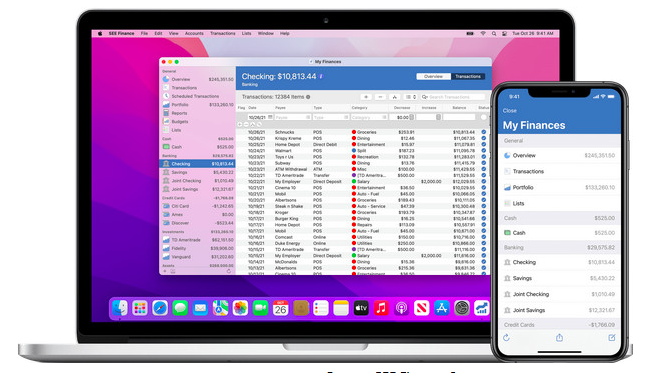
Why We Picked It
SEE Finance 2 is a powerful Mac-native app built for Quicken migrants. It offers precise Quicken QIF and Mint CSV import, ensuring your historical data transfers smoothly. With support for over 150 currencies and detailed investment tracking, it’s perfect for users with international accounts or diverse portfolios. It syncs via iCloud with its iOS app, delivering a cohesive Apple ecosystem experience.
Who It’s Aimed At
- Former Quicken/Mint users needing reliable data import
- Investors requiring detailed portfolio tracking
- Users with multi-currency accounts
- Those wanting a native macOS experience
Pricing
$39.99 – Free trial available
✅ Pros & ❌ Cons
✅ Built from the ground up for macOS
✅ Accurate Quicken and Mint data imports
✅ Strong investment tracking and financial reports
✅ Supports 150+ currencies
✅ iCloud sync with iOS app
❌ No Bill Pay functionality
❌ No EWC+ support (Direct Connect being phased out)
❌ Sync setup required (may not work with all banks)
13. CountAbout
Why We Picked It
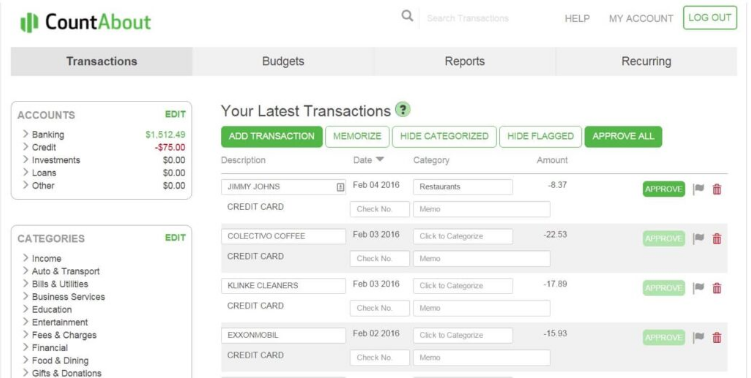
CountAbout is an affordable, browser-based alternative to Quicken, with excellent Quicken QIF import accuracy (minimal cleanup needed). It’s lightweight but covers the essentials: budgeting, bank syncing, and expense tracking. The Premium plan includes Direct Connect for U.S. banks, and the 45-day free trial is longer than most competitors. It’s ideal for Quicken users wanting a low-cost subscription without extra frills.
Who It’s Aimed At
- Quicken users seeking easy data migration
- Budgeters wanting bank syncing at a low cost
- Users who don’t need Bill Pay or investment planning
Pricing
$9.99/year (Basic) / $39.99/year (Premium with Direct Connect) – 45-day free trial
✅ Pros & ❌ Cons
✅ Excellent Quicken QIF import accuracy
✅ Low annual cost compared to alternatives
✅ Direct Connect included in Premium plan
✅ 45-day free trial (longer than most)
❌ No native Mac app (browser-based only)
❌ Limited features beyond budgeting and syncing
❌ Direct Connect support declining as banks adopt EWC+
14. MoneyWell
Why We Picked It
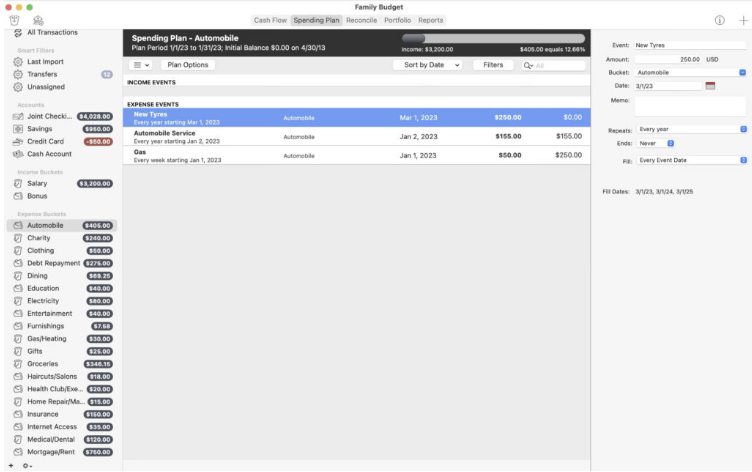
MoneyWell is a Mac-first app centered on envelope budgeting—perfect for users who want to manage spending in real time, not just track it. Its intuitive visualizations and transaction syncing balance simplicity and power. The clean macOS interface and interactive reports make it easy to stay on budget, while the iOS app (MoneyWell Express) offers mobile access. Past syncing issues have been resolved, making it a reliable choice.
Who It’s Aimed At
- Users who prefer envelope-style budgeting
- Mac users wanting clear visual financial reports
- Those seeking balance between manual control and automation
Pricing
$5.99/month / $49.99/year – Free trial available
✅ Pros & ❌ Cons
✅ Envelope budgeting to manage spending goals
✅ Clean, Mac-native interface with interactive reports
✅ iOS app for mobile access
✅ Resolved past syncing issues
❌ No EWC+ support (Direct Connect being phased out)
✅ Subscription-only pricing
❌ Free version limits to 200 transactions after cancellation
What We Prioritized in Our Testing
When evaluating the best Quicken alternatives for Mac, we focused on features that matter most to U.S. users:
Mac Compatibility
All apps work with Apple Silicon and the latest macOS versions (including macOS Sequoia).
Bank Syncing
We prioritized apps supporting modern standards like Plaid and EWC+, as Direct Connect is being phased out by U.S. banks .
Mobile Integration
Top picks offer full-featured iPhone/iPad apps—far more capable than Quicken’s limited mobile version.
Investment & Retirement Tools
We favored apps with robust tracking for stocks, 401(k)s, and retirement planning (a key focus for U.S. users) .
Budgeting Simplicity
Tools that make budgeting visual and intuitive, without Quicken’s outdated complexity.
Paperless & Tax Readiness
Apps that centralize bills and organize finances for easier tax preparation.
Top Picks by Category
Best Overall: Empower
Free, feature-rich, and native to Mac, it outperforms Quicken in investment tracking and retirement planning .
Best for Budgeting: YNAB
Its rule-based method helps users break paycheck-to-paycheck cycles, with 89% hitting financial goals within 18 months . Best for Apple Ecosystem: Copilot
Sleek design and seamless syncing across Mac, iPhone, and Apple Watch.
Best Mint Alternative
- Budgeting: Copilot (intuitive, cross-device sync)
- Investments: Empower (free, more powerful than Mint)
🇬🇧 Best for UK/EU Users
- Banktivity (supports PSD2/Open Banking)
- YNAB (connects to UK/EU banks via TrueLayer)
About the Author