Juggling your daily to-do list, team assignments, and project deadlines can quickly become a headache. Many Mac users turn to full-scale project management software, but sometimes, a more lightweight and focused task management app is the perfect solution.
Task Management vs. Project Management: What’s the Difference?
Think of project management tools as the command center for large, complex initiatives with multiple stages, teams, and interdependent tasks. Task management software, however, is your personal command post. It’s designed to help individuals or small teams organize and knock out specific tasks efficiently, without the overhead of detailed dashboards, Gantt charts, and complex workflows.
While there’s some overlap—tools like Smartsheet and monday.com bridge both categories—task management apps are generally more straightforward. For Mac users, the key is finding an app that is fast, reliable, and integrates well with macOS features like Calendar, Reminders, and Siri Shortcuts.
We’ve tested the top options on both Intel and Apple Silicon Macs and ranked them from the most feature-rich to the simplest. Here’s our lineup for 2025.
Quick Comparison Table
| App | Best For | Starting Price |
| Smartsheet | Scalable team workflows & automation | Free trial, from $9/user/month |
| monday.com | Team collaboration & visual boards | Free version, from $9/seat/month |
| Backlog | Teams mixing tasks & bug/issue tracking | Free (up to 10 users), from $35/month |
| TickTick | Cross-platform personal productivity | Free / $2.79 per month |
| Things 3 | A premium, native Apple ecosystem experience | $49.99 one-time (Mac) |
| Todoist | Cross-platform use for teams & individuals | Free / from $4 per month |
| OmniFocus | Advanced personal task management (GTD) | $49.99 one-time |
| Microsoft To Do | Users deep in the Microsoft ecosystem | Free |
| Trello | Visual, board-style task management | Free / from $5/user/month |
| Notion | An all-in-one workspace for tasks, notes & databases | Free / from $8/user/month |
| Apple Reminders | Built-in, simple, and seamless Apple integration | Free |
1. Smartsheet — Best for Scalable Task & Workflow Automation
Price: Free trial, plans from $9 per user/month
Best for: Teams that need powerful automation and flexible task tracking.
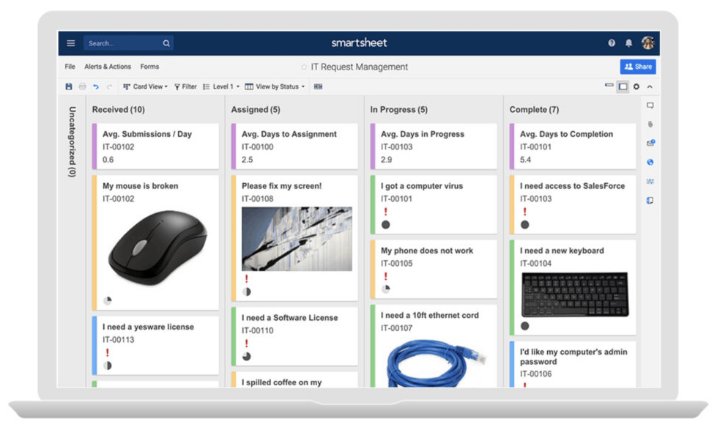
Smartsheet earns the top spot by combining a familiar spreadsheet-like interface with serious enterprise-level power. It’s incredibly flexible, allowing you to build anything from a simple personal checklist to a comprehensive company-wide task tracker. You can assign tasks, set dependencies, automate updates, and integrate it with other tools through its robust web or desktop app for Mac.
Pros:
- Intuitive spreadsheet interface that most people already understand.
- Powerful automation and collaboration features.
- Scales effortlessly from individual use to large teams.
Cons:
- Can be overkill for users who just need a basic to-do list.
2. monday.com — Best for Team Collaboration
Price: Free version, paid plans from $9 per seat/month
Best for: Teams that thrive on visual collaboration and clear dashboards.
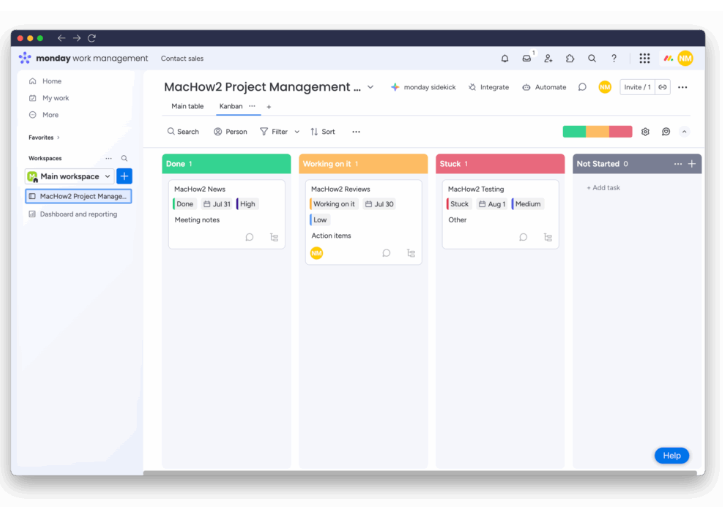
monday.com pairs strong task-tracking capabilities with colorful, intuitive boards that make it easy to see the status of any project at a glance. Its Mac desktop app performs flawlessly, syncing with the web version and integrating with popular tools like Slack, Google Drive, and Apple Calendar.
Pros:
- Excellent and responsive Mac app.
- Highly visual and customizable workflows.
- Great for teams of all sizes.
Cons:
- The cost can add up quickly with additional features and users.
3. Backlog — Best for Combining Tasks with Issue Tracking
Price: Free for up to 10 users, paid plans from $35 per month
Best for: Development and cross-functional teams that handle both tasks and bugs.
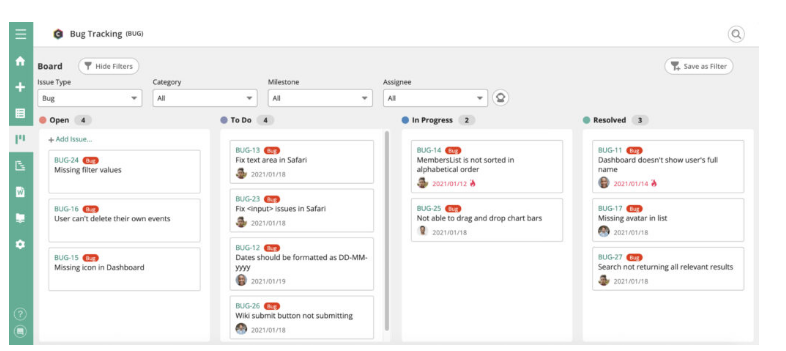
Backlog is a unique tool that seamlessly blends task management with project collaboration and issue tracking. It’s ideal for teams that need to manage general work items alongside technical bug reports, offering subtasks, Kanban boards, Gantt charts, and even Git/SVN integration.
Pros:
- Unifies task and issue tracking in a single platform.
- Multiple viewing options: Kanban, list, and Gantt.
- Excellent for developers and technical teams.
Cons:
- Might feel too complex for simple personal task management.
4. TickTick — Best for Personal Productivity
Price: Free / Premium $2.79 per month
Best for: Individuals who want a simple, powerful, and reliable task list.
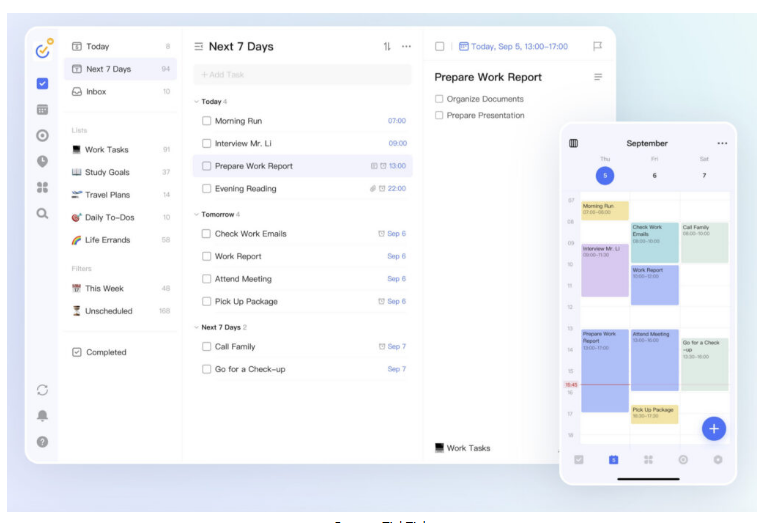
TickTick is one of the best-designed task apps for Mac. It offers list and calendar views, recurring tasks, a built-in Pomodoro timer, and smart natural language input (like typing “meeting tomorrow at 2pm”). It syncs perfectly across macOS, iOS, and the web.
Pros:
- Clean and intuitive Mac interface.
- Fast, lightweight, and available on all platforms.
- Includes useful extras like habit tracking.
Cons:
- Team collaboration features are limited.
5. Things 3 — Best Native Mac Experience
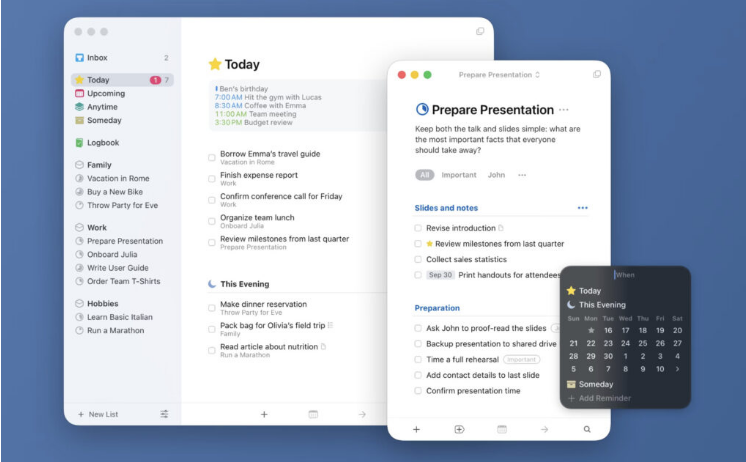
Price: One-time purchase of $49.99 for Mac
Best for: Apple purists who value beautiful design and simplicity.
Things 3 is an Apple Design Award winner for a reason. It’s gorgeous, incredibly fast, and built exclusively for macOS, iOS, and iPadOS. If you live entirely within the Apple ecosystem, Things 3 syncs beautifully with your Calendar and Siri.
Pros:
- Stunning, native Mac interface.
- Deep and seamless integration with the Apple ecosystem.
- No subscription required.
Cons:
- No web or Windows version, locking you into Apple devices.
6. Todoist — Best for Cross-Platform Users
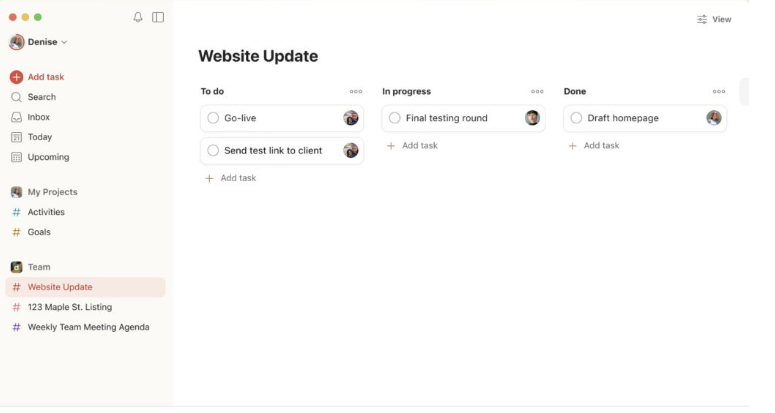
Price: Free / Premium from $4 per month
Best for: Anyone who switches frequently between Mac, Windows, Android, and iOS.
Todoist remains a crowd favorite for its clean design and powerful simplicity. The Mac app is swift, and you can add tasks from almost anywhere using email or browser extensions. Its natural language processing is top-notch.
Pros:
- Works seamlessly on every platform.
- Excellent natural language input.
- Solid collaboration features.
Cons:
- Some advanced features require an internet connection.
7. OmniFocus — Best for Power Users (GTD)
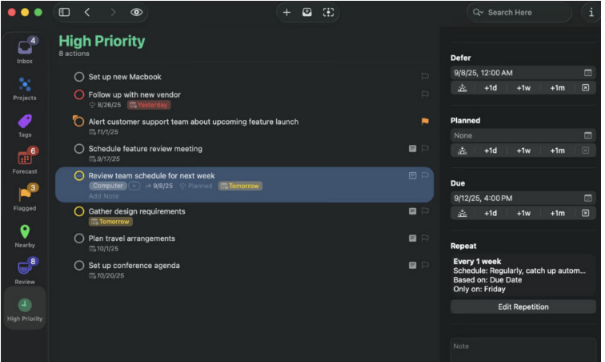
Price: Standard license for $49.99 (one-time) or Pro subscription
Best for: Productivity experts and followers of the Getting Things Done (GTD) methodology.
OmniFocus is built for those who take task management seriously. This Apple-exclusive app offers deep customization, custom perspectives, and extensive automation via Apple Shortcuts. It provides maximum structure and control for complex personal workflows.
Pros:
- Made exclusively for and integrated with Apple devices.
- Extremely powerful filtering and tagging system.
- Unmatched for complex, customized workflows.
Cons:
- Has a steeper learning curve than most apps.
8. Microsoft To Do — Best Free Option
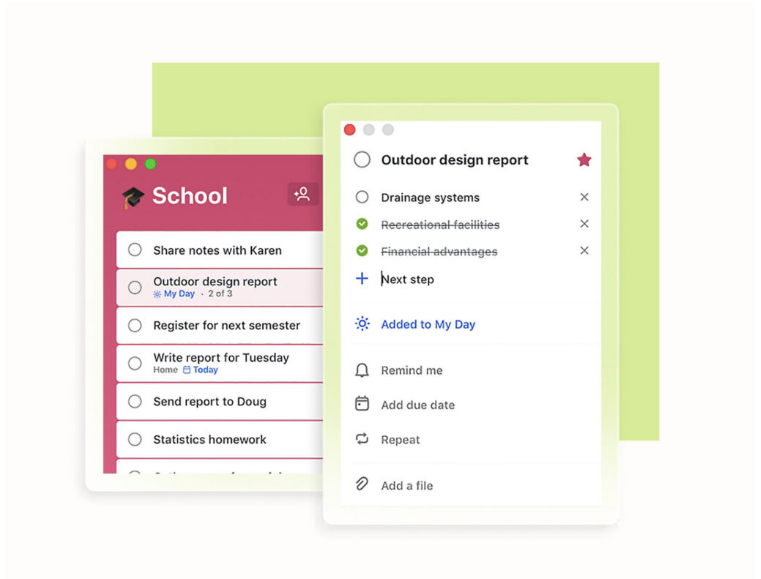
Price: Free
Best for: Anyone who already uses Outlook or Microsoft 365.
Microsoft To Do is a simple, free, and surprisingly capable task manager for Mac. It syncs perfectly with Outlook Tasks, supports smart lists and recurring reminders, and fits neatly into the broader Microsoft ecosystem.
Pros:
- Completely free.
- Excellent sync with Outlook and Microsoft Teams.
- Simple and reliable.
Cons:
- Limited integration with non-Microsoft services.
9. Trello — Best for Visual Organization
Price: Free / Paid plans from $5 per user/month
Best for: Visual thinkers and teams who love the Kanban board method.
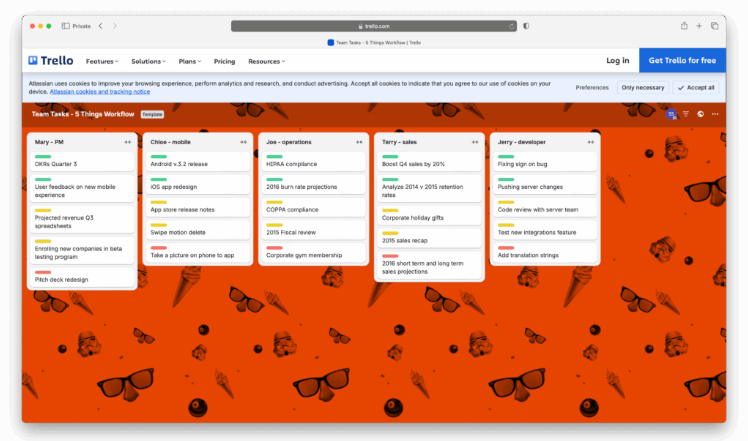
Trello is a classic for a reason. It lets you organize tasks as cards on collaborative boards, making it perfect for managing workflows in a visual way. The Mac desktop app is smooth and syncs instantly.
Pros:
- Simple, drag-and-drop interface.
- Ideal for team-based board management.
- Huge library of power-ups and integrations.
Cons:
- Lacks built-in time-tracking features.
10. Notion — Best All-in-One Workspace
Price: Free / Plus plan from $8 per user/month
Best for: Users who want to combine tasks, notes, and databases in a single, customizable space.
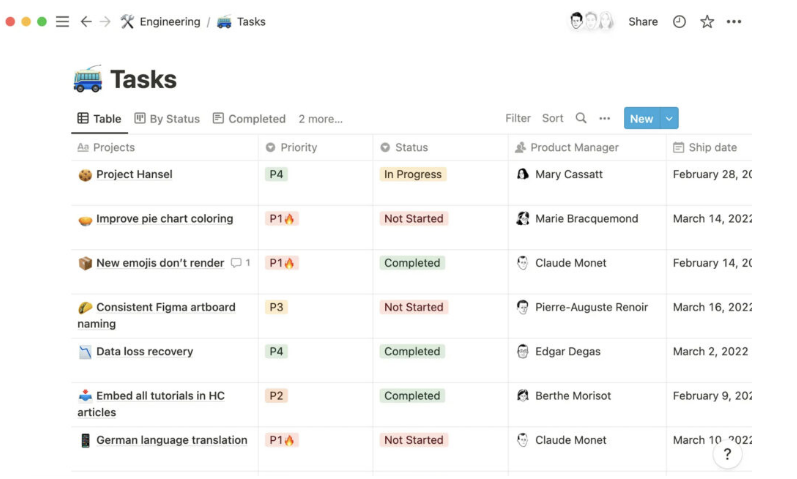
Notion is more than a task manager; it’s a customizable workspace. You can build your own project dashboards, knowledge bases, and task lists. The native Mac app runs great on Apple Silicon and works offline.
Pros:
- An incredibly versatile all-in-one platform.
- Highly customizable to fit any workflow.
- Great performance on Mac.
Cons:
- Requires time and effort to set up effectively.
11. Apple Reminders — Best for Simplicity & Integration
Price: Free
Best for: Apple users who want a no-fuss, built-in solution.
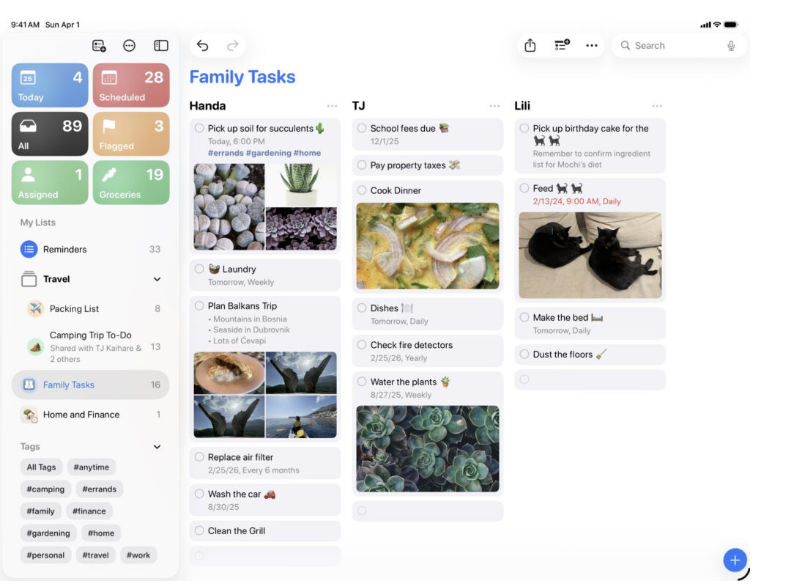
The Reminders app has grown up. With recent macOS updates, it now features smart lists, subtasks, and deep Siri integration. It’s the perfect choice if you want a simple, free app that syncs automatically across all your Apple devices via iCloud.
Pros:
- Built directly into macOS and iOS.
- Free and incredibly easy to use.
- Fantastic Siri and Shortcuts integration.
Cons:
- Lacks advanced features like automation or robust team collaboration.
How to Choose the Right Mac Task Manager
Here are a few key questions to ask yourself before making a decision:
- Team or Solo? For team collaboration with assignment tracking, lean towards Smartsheet or monday.com. For solo or small-team use, TickTick, Things 3, or OmniFocus are great.
- Mac Integration Matters? If you want a deep, native experience with widgets and Shortcuts, choose Things 3 or OmniFocus. If a web-app in a desktop wrapper is fine, most others will work.
- Simple or Complex? For basic to-dos, TickTick or Todoist are perfect. For workflows, automations, and multiple views, look at Smartsheet or monday.com.
- Budget? More features usually mean a higher cost. Don’t over-invest if your needs are simple.
- Planning to Grow? If you think your needs might become more complex, start with a scalable platform like Smartsheet or monday.com to avoid a messy migration later.
Frequently Asked Questions
Can I use these for just personal tasks on my Mac?
Absolutely. Even team-oriented platforms can be used personally, but they might be overkill. The key is to match the app’s complexity to your own needs.
Do I need a native Mac app, or is a browser tab okay?
Browser-based tools work, but native Mac apps (or well-built desktop wrappers) offer better integration with macOS, including system notifications, keyboard shortcuts, and offline access.
What’s the real difference between task and project management?
As a reminder: task management is about organizing individual action items. Project management involves coordinating resources, timelines, and dependencies across many tasks. If you don’t need the latter, a lightweight task tool is your best bet.
Will these work on my new Apple Silicon Mac?
Yes. All the apps on this list have been tested and work well on both Intel and Apple Silicon Macs. Native apps will have the best performance, but web-based apps also run smoothly.
About the Author